Metro Page Builder

Build the page you actually pictured.

A Dream builder for School Sites .
Drag blocks onto the canvas in the admin, then open the same page on the front end and move things while you look at them. No shortcodes, no theme lock-in, and nothing to upload.
  • Joomla 5 and Joomla 6
  • Works on any template
  • GPL, no encoded files
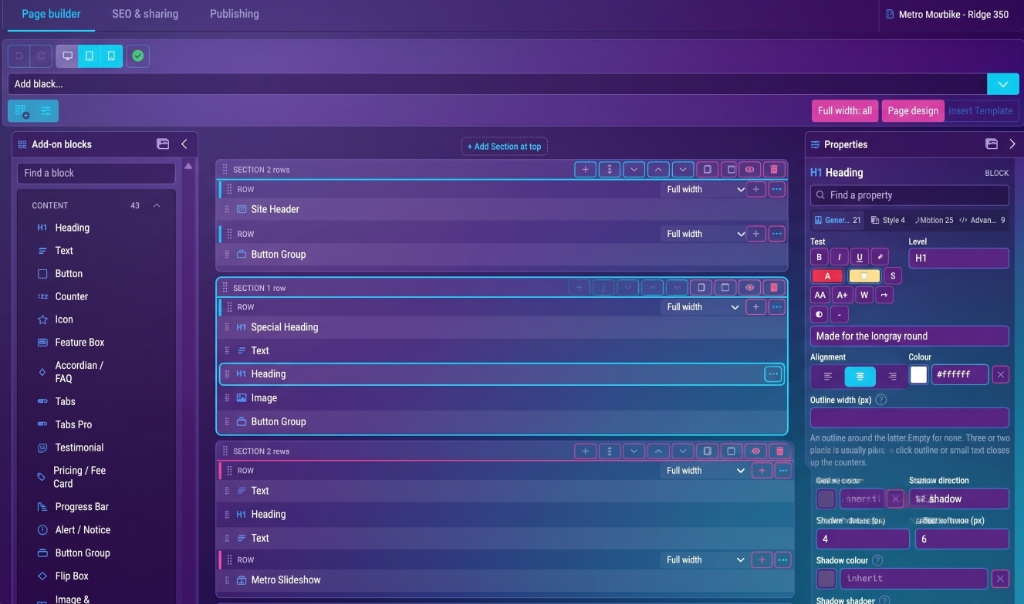
The Metro Page Builder canvas: a block palette on the left, a page being laid out in the middle, and the settings for the selected block on the right.

Runs on

  • Joomla 5
  • Joomla 6
  • Adhrit LMS
  • Rudra Pro ERP
  • Any Joomla template
  • PHP 8.1 - 8.4
100
Add-ons in the box
Every one listed below
226
Ready-made layouts
Pick one, then change everything
0
Upload endpoints
Nothing can be posted to this component
4,617
Tests, all passing
Run before every release
The catalogue

All 100 add-ons.
Not a selection.

Not "50+", and not the six that photograph well. This list is read out of the component itself when the page loads, so it is exactly what you install — and it grows on its own the day a new block ships.

Content

  • Accordion / FAQ
  • Alert / Notice
  • Animated Heading
  • Block Number
  • Button
  • Button Group
  • Circle Menu
  • Coming soon screen
  • Contact Form
  • Cookie notice
  • Countdown
  • Counter
  • Court booking board
  • Feature Box
  • Fixtures & results
  • Flip Box
  • Flip Box Pro
  • Heading
  • Icon
  • Icon List
  • Image & Content
  • Liquid Glass
  • Metro EMI Calculator
  • Metro FAB
  • Popup
  • Price List
  • Pricing / Fee Card
  • Progress Bar
  • Progress Bar Pro
  • Restaurant Menu
  • Search
  • Social Icons
  • Social Share
  • Special Heading
  • Stacking Cards
  • Support Box
  • Table
  • Tabs
  • Tabs Pro
  • Team / Staff
  • Testimonial
  • Testimonial Pro
  • Text
  • Timeline
  • Timeline Pro

Media

  • Before and After
  • Carousel / Banner
  • Carousel Pro
  • Client Logos
  • Gallery
  • Image
  • Image Wall
  • Intro Curtain
  • Live Stream
  • Map
  • Metro 360
  • Metro Image Slider
  • Metro Panorama
  • Metro Slideshow
  • Metro Switch Hero
  • Mosaic
  • Music Player
  • Product Callouts
  • Ticker
  • Video
  • Video Hero
  • Video Playlist
  • Video Product Callouts
  • Weather

Layout

  • Divider
  • Footer Menu
  • Ghost Word
  • Joomla Menu
  • Logo
  • Metro Mega Menu
  • Site Header
  • Spacer

Joomla & Rudra integrations

  • Adhrit LMS Carousel
  • Adhrit LMS Course Categories
  • Adhrit LMS Courses
  • Adhrit LMS Event Categories
  • Adhrit LMS Events
  • Adhrit LMS Search
  • Adhrit LMS Single Course
  • Adhrit LMS Single Event
  • Adhrit LMS Single Speaker
  • Adhrit LMS Single Teacher
  • Adhrit LMS Speakers
  • Adhrit LMS Teachers
  • Adhrit: Teacher Profile
  • Article Scroller
  • Joomla Articles
  • Joomla Module
  • Repository Showcase
  • Rudra: Admission Enquiry Form
  • Rudra: Notice Board
  • Rudra: Staff Profile

Advanced

  • Custom HTML (Super User only)
  • Loading Screen
Why this one

Four decisions you will feel
on day one.

Edit on the front end

Build in the admin, then open the live page and move things while you look at them.

Superuser only

The front-end editor checks core.admin on both the render and the save, independently. Drag between sections, overlap deliberately, twenty-five steps of undo.

Nothing can be uploaded

The component has no upload endpoint at all — not a disabled one, not a guarded one.

Zero attack surface

The whole class of file-upload vulnerabilities that keeps hitting page builders needs somewhere to post a file. There is nowhere.

It bends to your template

Metro reads your Joomla menus and your template's colours instead of replacing them.

Custom properties

Sections redeclare CSS variables, so an integrated component restyles itself. No !important, no file edits, nothing to redo after an update.

Custom CSS on everything

Every block, row and section takes its own CSS. This page is built entirely from it.

Scoped for you

Write `& { }` and it is scoped to that block alone. You cannot accidentally restyle the rest of the site from inside one card.

Inside the builder

Two ways to build.
The same page either way.

Lay the page out in the admin with the palette and the inspector, or open it on the front end and move things while you look at them. Same page, same blocks, saved to the same place.
  • PaletteFifty-eight blocks, grouped and searchable
  • Spot toolbarDuplicate, move or delete without leaving the block
The builder canvas with its palette, page and inspector labelled.
  • CanvasDrag anywhere. Sections overlap on purpose
  • InspectorStyle and Advanced tabs on every block
Blocks placed by dragging 100%
No shortcodes anywhere
Layouts you can start from 100%
All 234 are editable
Encoded or obfuscated files 0%
GPL, readable, yours
Start from something

226 layouts included.
Every one of them editable.
Schools, clinics, restaurants, shops, course catalogues, portfolios. Load one, change the words and the colours, and you have a site. Nothing is locked.
Business & care
Business & care51 layouts
Showcase
Showcase35 layouts
Signature
Signature27 layouts
Sports
Sports24 layouts
Hospitality & venues
Hospitality & venues22 layouts
Schools
Schools22 layouts
Resumes
Resumes17 layouts
Shops & retail
Shops & retail13 layouts
Learning & LMS
Learning & LMS10 layouts
Gamers & creators
Gamers & creators8 layouts
Start & utility
Start & utility5 layouts
Every one of these ships

Start from a design,
not from an empty page.

Build in an afternoon, not in days.

Install, pick a layout, replace the words. The parts that usually eat a week — the menu, the header, the mobile breakpoints — are already done and already wired to your Joomla menus.

Updates never break a page

Every release installs clean or updates in place, and pages built on an older version keep rendering. That is a test, not a promise.

  1. Minute 0

    Install

    One package. Component, module and the media it needs.

  2. Minute 2

    Pick a layout

    234 to start from, or an empty canvas if you would rather.

  3. Minute 10

    Make it yours

    Drag blocks in, set colours, write the words. Custom CSS on anything that needs it.

  4. Minute 40

    Tune it live

    Open the page on the front end and nudge things while you look at them.

  5. Minute 45

    Ship

    Meta, keywords and robots are on the page's second tab, already length-checked.

Side by side

What you get, and what you
usually get.

No brand names, because the point is not who else is out there — it is which of these lines you have been living with.
Metro Page BuilderThe usual arrangement
Add-ons99, all includedA free tier and a "pro" tier
Ready-made layouts234, all editableDownloaded one at a time
Front-end editingYes, superuser onlyOften a separate product
Custom CSSEvery block, row and sectionSometimes, sometimes not
File upload endpointNone at allUsually several
Encoded filesNone. GPL throughoutVaries, and you find out later
Your Joomla menusRead and rendered as they areRebuilt in the builder
Template lock-inNone. Works on any templateFrequently its own template
Meta and robotsOn every page, length-checkedA separate extension

What this thing believes

Four commitments the code actually keeps. When there are customer quotes worth printing, they go right here.

Nothing on a page should animate before the finished state has rendered. If the script never arrives, the page is still complete.
On motion
A component with no upload endpoint cannot have an upload vulnerability. That is worth more than any amount of validation.
On security
A block's CSS is scoped to that block. You cannot restyle the rest of the site from inside one card, even by accident.
On custom CSS
Your template keeps its menus, its fonts and its colours. Metro fits into a site; it does not replace one.
On lock-in
Pricing

One product. No tiers of add-ons.

Every plan gets all 99 add-ons and all 234 layouts. What changes is how many sites you may install it on, and how long updates keep coming.
Single site
49one site, one year of updates
  • All 99 add-ons
  • All 234 layouts
  • Front-end editor
  • 12 months of updates
  • Email support
Buy single site
Agency
249unlimited sites, one year of updates
  • Everything in Five sites
  • Unlimited client sites
  • Client-ready layout exports
  • 12 months of updates
  • Named support contact
Buy agency
  • Updates keep working after the year is up
  • GPL. Read it, change it, keep it
  • 30 days, no questions
Before you buy

The questions people actually ask.

If yours is not here, ask before you buy rather than after.
Not sure it fits? Ask before you buy - a straight answer costs us nothing and saves you a refund.
Will it work with my template?
Yes. Metro renders into whatever template you already run, and reads your existing Joomla menus rather than asking you to rebuild them. There is no Metro template you are obliged to switch to.
Do I need to know CSS?
No, and you are not stopped from using it. Everything on this page can be built from the settings panels; the custom CSS field is there for the day a client asks for something no panel anticipated.
What happens when the year of updates ends?
The version you have keeps working forever. You stop receiving new ones until you renew. Nothing phones home and nothing switches off.
Is anything encoded?
No. It is GPL PHP, CSS and JavaScript you can open and read. If a vendor will not let you read the code that runs on your server, that is the answer to a different question.
Can my editors break the site?
The front-end editor is superuser-only, checked independently when the page is drawn and again when it is saved. Custom HTML is also superuser-only, for the same reason.
Does it slow the page down?
Nothing loads that a page does not use. Video blocks show a thumbnail and a play button until someone clicks, so no third-party player is fetched on load.
What about SEO?
Every page has a second tab for title, description, keywords, robots and AI-crawler directives, with the optimal lengths enforced as you type rather than checked afterwards.
Does it work with Adhrit LMS or Rudra ERP?
Yes, and it restyles them. Sections redeclare the CSS variables those components already read, so their own modules pick up your colours with no file edits.

Everything above was built with the thing you are buying.

No hand-written HTML, no theme that only the sales page gets. View the source and you are looking at the output of the same blocks that arrive in the box.
30-day refund. GPL licence. No account required to use it.